How to Build a Bank Financial Screener in Python
The FFIEC 041 bulk download for a single quarter is a set of tab-delimited files with 2,300+ columns keyed by MDRM codes like RCON2170 (total assets) and RIAD4340 (net income). …
The FFIEC 041 bulk download for a single quarter is a set of tab-delimited files with 2,300+ columns keyed by MDRM codes like RCON2170 (total assets) and RIAD4340 (net income). Before you get to any actual analysis, you are writing a MDRM lookup table, figuring out which Schedule RC-C column maps to which UBPR ratio, and deciding how to annualize quarterly flow items without introducing a denominator error. This is not exotic work. It is just expensive.
One note on prefixes before you pull anything. The same call report item carries a different prefix depending on which form the bank files. FFIEC 041 and 051 filers report RCON, for domestic offices. FFIEC 031 filers report RCFD on a consolidated basis, and RCFN for foreign offices, so total deposits for an 031 filer is RCON2200 plus RCFN2200 rather than RCON2200 alone. Schedule RC-R Part I (regulatory capital and the capital ratios) moved off RCON with the Basel III revisions of 2014 and 2015 and now uses RCOA on the 041 and 051 and RCFA on the 031; Part II (risk-weighted assets) still reports under RCON and RCFD. Query a single prefix and you will silently drop a whole population rather than get an error, and for an RCON-only query that population is the largest banks in the country.
Building a bank financial screener in Python should take an afternoon. Here is how to do it without the data archaeology.
The Case for Your Own Screener
Enterprise platforms will sell you one. A few vendors have decent screeners, and if your workflow is genuinely read-only (browsing, not building), they might be worth the cost. But if you are doing portfolio surveillance, peer group construction, or any kind of recurring monitoring, a black-box UI has a specific failure mode: you cannot see the filter logic, you cannot extend it, and you definitely cannot pipe its output into your own models.
FFIEC Call Reports, UBPR ratios, FDIC institutional data, Federal Reserve Y-9C filings, and NCUA 5300 data for credit unions are all public; the official source for the Call Report and UBPR is the FFIEC. The problem has never been access. It has been normalization: reconciling item codes across form variants, handling amended filings, surfacing the right denominator, keeping it current. That is the layer BankRegReports handles.
Once the data is clean, the screener is just a DataFrame filter.
Setup
pip install bankregreports
Get a free API key at bankregreports.com/api. Either pass it directly or export it as an environment variable:
export BANKREG_API_TOKEN=brr_xxx
The full endpoint reference lives at the BankRegAPI Swagger UI, and it is worth reading before you write any code, because it documents the field definitions and their regulatory source.
import bankregreports

brr = bankregreports.BankReg("brr_xxx")
How Do You Pull the Universe?
A screener needs a universe. For U.S. commercial banks, that means FDIC-insured institutions filing the FFIEC 031, 041, or 051. screener() returns one row per institution, current reporting period, with capital ratios, asset quality metrics, profitability, and size already normalized. It is paginated: a single call returns 50 rows, so collect every page with brr.pages() (deep pagination needs a paid API plan; free keys get 50 rows per page up to offset 1,000, so a free key reaches about 1,050 rows, not the whole universe). pages() stops on the first page that comes back shorter than page_size, so set page_size to what your plan actually returns.
import bankregreports
import pandas as pd

brr = bankregreports.BankReg("brr_xxx")

# Free key: 50 rows per page, offset capped at 1,000, so about 1,050 rows.
# Paid plan: PAGE_SIZE = 500 and MAX_ROWS = None walk the whole universe.
PAGE_SIZE, MAX_ROWS = 50, 1_050
df = pd.concat(
    brr.pages("screener", page_size=PAGE_SIZE, max_records=MAX_ROWS),
    ignore_index=True,
)
# Columns: rssd_id, fdic_cert, legal_name, hq_city, hq_state, asset_tier,
#          total_assets (thousands of dollars), cet1_ratio, npl_ratio,
#          texas_ratio, roa, roe, nim, efficiency_ratio, leverage_ratio,
#          is_well_capitalized
print(df.shape)   # (rows, metric columns)
print(df[["legal_name", "hq_state", "total_assets", "cet1_ratio"]].head(3))
No MDRM lookups. No Schedule RC-N cross-reference. The annualization and ratio logic is already done.
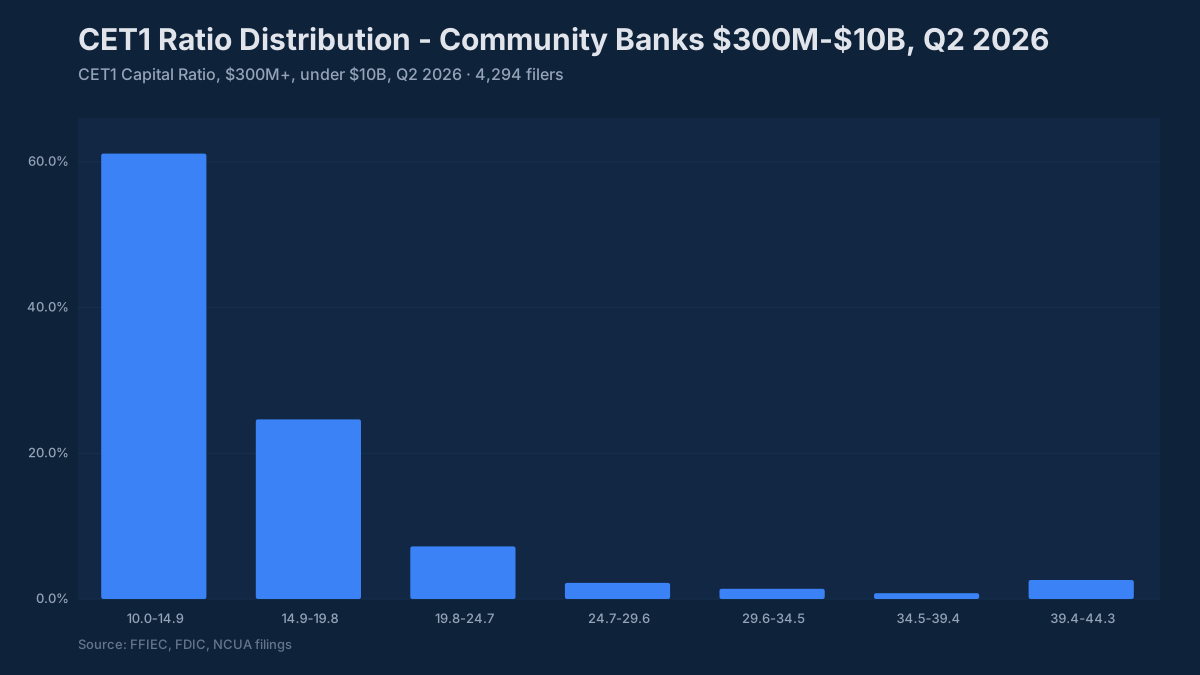
Most community banks are better-capitalized than the headlines suggest. The median CET1 ratio for banks between $300 million and $10 billion was 14.0% at June 30, 2026 (13.6% at March 31, 2025), well above the 6.5% well-capitalized threshold. The screener below is filtering for the top tier.
The Screener
Four dimensions cover most of what an ALCO or credit analyst wants to see first: capital adequacy, asset quality, profitability, and size plus efficiency.
import bankregreports
import pandas as pd

brr = bankregreports.BankReg("brr_xxx")
PAGE_SIZE, MAX_ROWS = 50, 1_050   # paid plan: 500, None (see above)
df = pd.concat(
    brr.pages("screener", page_size=PAGE_SIZE, max_records=MAX_ROWS),
    ignore_index=True,
)

MIN_ASSETS      = 500_000     # $500M floor (total_assets is in thousands)
MAX_ASSETS      = 50_000_000  # $50B cap - community/regional focus
MIN_CET1_RATIO  = 10.0        # 350bp above the 6.5% well-capitalized threshold
MAX_NPL_RATIO   = 2.0         # Above here, credit migration risk starts showing
MIN_ROA         = 0.75        # Annualized return on average assets, percent
MIN_NIM         = 2.50        # Net interest margin floor, percent
MAX_EFFICIENCY  = 65.0        # Noninterest expense per dollar of revenue, percent

screened = df[
    (df["total_assets"]     >= MIN_ASSETS) &
    (df["total_assets"]     <= MAX_ASSETS) &
    (df["cet1_ratio"]       >= MIN_CET1_RATIO) &
    (df["npl_ratio"]        <= MAX_NPL_RATIO) &
    (df["roa"]              >= MIN_ROA) &
    (df["nim"]              >= MIN_NIM) &
    (df["efficiency_ratio"] <= MAX_EFFICIENCY)
].sort_values("roa", ascending=False)

cols = [
    "legal_name", "hq_state", "total_assets",
    "cet1_ratio", "npl_ratio", "roa", "nim", "efficiency_ratio"
]
print(screened[cols].to_string(index=False))
On the thresholds: a CET1 floor of 10% is 350 bp above the 6.5% well-capitalized threshold. That margin matters in a stress scenario: a bank at 6.6% CET1 has almost no room before enforcement triggers. An NPL ratio above 2.0% is not a disqualifier by itself, but it warrants a deeper look at Schedule RC-N (past-due and nonaccrual) and the reserve coverage ratio. The screener rows do not carry a loan-to-deposit ratio, so check liquidity on the shortlist: pull brr.bank_deposits(rssd_id) for each survivor before you rely on the screen.
The NIM floor of 2.50% is environment-dependent. In 2021 it would have been generous. In 2024-2025, as funding costs caught up to asset yields, it became a reasonable quality bar.
Adding a Trend Filter
Snapshot metrics show where a bank is. They do not show whether it arrived there by improving or by slowly eroding from a better position.
# Pull 6-quarter history for the top result
rssd_id = int(screened.iloc[0]["rssd_id"])

trend = brr.bank_trends(rssd_id, quarters=6)
print(trend)
# Returns one row per quarter (report_date) with the normalized
# metric columns, so you can see the trajectory rather than a
# single-period snapshot.
This is the difference between a bank that looks good and one that is getting better. NIM expanding six quarters in a row with CET1 building alongside it is a different institution than one that passed your screen on current-period numbers but has been compressing for two years.
Holding Company Context
Many community bank workflows need the holding company alongside the bank entity, especially when evaluating dividend capacity or upstream debt. The Federal Reserve Y-9C covers bank holding companies; BankRegReports normalizes these through the NIC entity linkage, and bank_structure() resolves a bank to its parent-holding-company chain.
structure = brr.bank_structure(rssd_id)
print(structure)
# Returns the entity's structure and its parent-holding-company linkage,
# so you can pull the corresponding FR Y-9C holding company alongside the bank.
A bank subsidiary can look well-capitalized while the holding company carries upstream debt that changes the stress picture entirely. Having both entities in the same schema removes the manual join against NIC parent-chain data.
Export and Automation
screened[cols].to_csv("bank_screen_2026Q2.csv", index=False)
For recurring monitoring, wrap the screener in a script and schedule it weekly. Because BankRegReports reflects regulatory filings as they are processed through the FFIEC and FDIC ingestion pipeline, you are working from current data rather than a static vintage snapshot.
One practical note: Call Reports are due 30 days after quarter-end (35 days for banks with more than one foreign office), and amendments can keep revising a quarter for weeks after that. The API returns the most recent processed quarter, and the screener response’s metadata carries an as_of date (df.attrs["meta"].get("as_of")) so you know exactly what period you are looking at.
What This Replaces
To build this without the BankRegAPI, you are looking at:
- Parsing FFIEC 041 bulk files, which are tab-delimited with inconsistent quoting and column names that shift when the FFIEC revises reporting schedules
- Cross-referencing MDRM codes against the Call Report instruction book to confirm you are using RCON2170 (total assets, domestic) vs. RCFD2170 (total assets, domestic + foreign) correctly for a given institution type
- Writing annualization logic for Schedule RI flow items (RIAD4340 net income is year-to-date, not quarterly; you need to subtract prior periods)
- Joining FDIC BankFind for institution metadata, NIC for holding company linkage, and UBPR text files for pre-computed ratios
- Handling amended filings, which can restate numbers silently in bulk downloads
None of this is hard. It is just time that should go to analysis instead of plumbing. The annualization error alone (treating year-to-date income as quarterly) is one of the most common mistakes in bank models built from raw Call Report data. Q1 comes out right, but Q2 through Q4 are overstated by a factor of two to four if you are not subtracting the prior period.
What Comes Next
The same screener pattern extends to credit unions on NCUA 5300 data, holding company surveillance against Y-9C filings, or cross-referencing bank performance against SEC EDGAR for publicly-traded holding companies. BankRegReports covers all of these sources under the same normalized schema and the same SDK interface: you change the method call, not the data model.
One thing worth building once you have the screener running: a peer group constructor. Take your screened universe and segment it by asset tier and geography, then compute median ratios within each segment. That gives you a baseline for what “normal” looks like in a given peer group, which makes the outliers in your screen far more interpretable. A 1.20% ROAA means something different for a $750M bank in a rural Midwest market than for a $40B super-regional.
BankRegReports publishes call report, UBPR, FDIC, Federal Reserve, NCUA, and SEC EDGAR data for every U.S. bank and credit union, with peer benchmarks and quarterly history. Look up a bank