
Bank financial analysis software built on every call report.

Read any US bank's balance sheet, earnings, capital and credit quality, with peer context and 26 years of quarterly history, free to start.

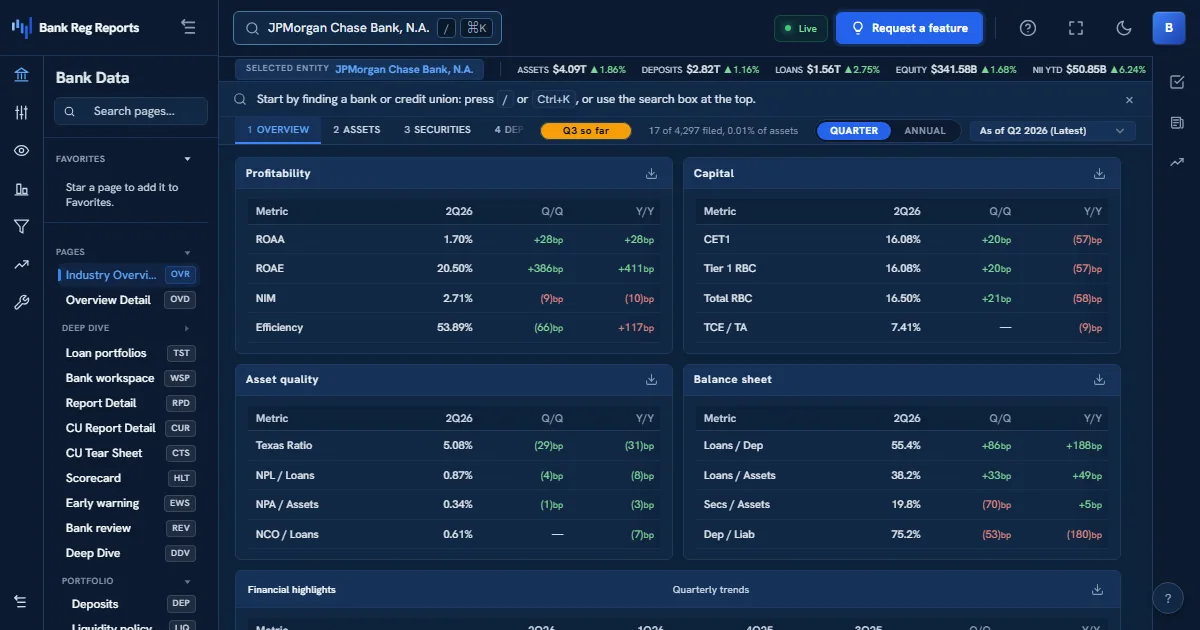
BRR Terminal overview showing profitability, capital, and asset-quality ratio panels with quarter-over-quarter deltas and a total-assets trend chart for a bank.

Bank financial analysis software turns a bank's regulatory filings into the ratios an analyst actually reads. BankRegReports does that for all 4,196 FDIC-insured banks and every federally insured credit union: each quarterly FFIEC call report and NCUA 5300 filing becomes a profile with the balance sheet, income statement, capital, asset quality and liquidity, each ratio set against the bank's peers and its own history back to Q1 2000. Browsing, peer groups and screeners are free; Pro adds Excel tearsheets and CSV exports.

The challenge

  • Raw call report schedules are not analysis: someone has to build every ratio, every quarter.
  • A ratio means little without peers and history, and assembling both by hand takes a day per bank.
  • Credit memos, board packets and diligence files need the same numbers in a format someone can file.

How BankRegReports helps

Every bank, read the same way

892 standardized measures per bank, built from the call report and the UBPR, from total assets and net interest margin to CET1, the Texas ratio and CRE concentration. Each core ratio is defined in the glossary with its formula.

Open the bank directory →

Peer context on every ratio

Every bank is ranked against the banks in its asset-size tier by default, and a free account builds a custom peer group from a state, charter, size band or a hand-picked list.

Compare banks side by side →

Excel, CSV and the API

On the Pro plan, export a formatted Excel tearsheet for one bank or up to 20, or CSV metric histories (up to 40 quarters and 20 banks), current through the latest quarter loaded. The REST API at /api/v1/ and the Excel add-in (beta, on every plan) serve the same measures to your own models and workbooks.

See pricing →

How bank analysts put it to work

Typical workflows, from the first search to a client-ready or board-ready output.

Write the credit memo on a bank counterparty

You need a bank's capital, earnings and asset-quality trend against peers for a credit file, without rebuilding it from the call report.

  1. Search the bank and open its profile.
  2. Read capital, asset quality and earnings with the twelve-quarter trend and the peer percentile.
  3. On the Pro plan, export the Excel tearsheet for the file.

Screen a market for banks worth a closer look

You want every bank in a state above a size cut with a falling margin or a rising nonaccrual rate, ranked, not a list to read one by one.

  1. Open the rankings or a screener and filter by state and asset size.
  2. Sort by the ratio that matters to the question.
  3. Open each shortlisted bank's profile for its trend and peer context.

See it in action

The same views you'll work in, on real FDIC-insured banks, refreshed every quarter.

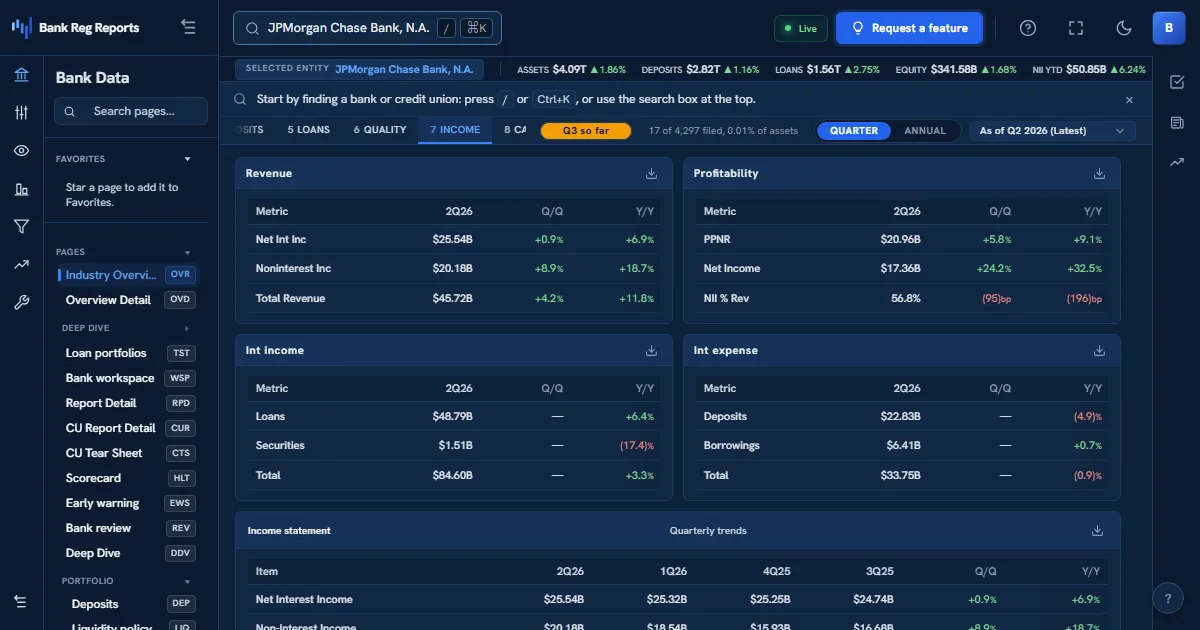
BankRegReports income view showing net interest income, fee income, the efficiency ratio, the full income statement, and a net-income trend for a bank.

Earnings, decomposed

Net interest margin, fee income, the efficiency ratio and pre-provision profitability beside the full income statement and its trend.

See pricing →

Frequently asked questions

What is bank financial analysis software?

Software that turns a bank's regulatory filings (the quarterly FFIEC call report, and for credit unions the NCUA 5300) into ratios, trends and peer comparisons, so an analyst can judge earnings, capital, asset quality and liquidity without building each figure from the raw schedules.

Which banks does BankRegReports cover?

Every FDIC-insured bank, with quarterly history back to Q1 2000, every federally insured credit union from NCUA 5300 filings, and bank holding companies from the FR Y-9C.

Is it free?

Browsing every FDIC-insured bank and federally insured credit union, peer benchmarking, rankings, screeners, alerts and a daily API allowance are free. Pro adds Excel tearsheets, CSV exports and a higher daily API allowance, at the price published on the pricing page.

Is there an API or Excel add-in?

Yes. The REST API at /api/v1/ and the Excel add-in (beta, on every plan) serve the same standardized measures shown on each bank profile. The API has a free daily allowance and Pro raises it; current limits are on the API pricing page.

How current is the data?

We load a new quarter within 2 business days of the FFIEC release and pick up amended filings within 7 days. The Data Updates page shows the latest quarter loaded.
See it on your bank

Every FDIC-insured institution, 26+ years of standardized data, one search away.